Icon of program: Comodo Internet Security

Comodo Internet Security for Windows

  • Free
  • 4.4
    4780
  • 126K
  • V12.3.4.8162
Free Download for Windows

View an ad to download for free

Comodo Internet Security: Multi-layered Windows security protection

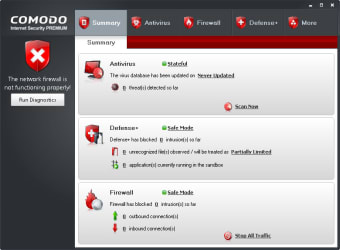
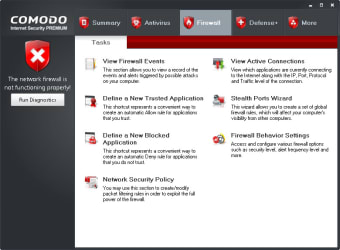
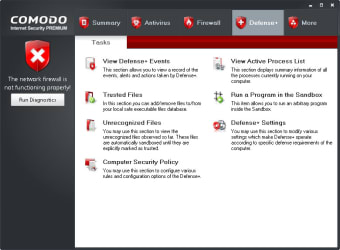
Comodo Internet Security is a Windows security suite built around prevention, containment, and firewall protection. It combines antivirus scanning, spyware detection, a personal firewall, Auto Sandbox Technology, cloud-based analysis, application control, and malicious website filtering to help stop threats before they affect the PC.

Top Recommended Alternative

How does Comodo verify safe applications?

Comodo uses Default Deny Protection to allow known safe files and applications while restricting unknown or untrusted programs. It also gives users access to Comodo’s safe-list of PC-friendly files and applications, helping the software distinguish trusted programs from potential threats.

How does it prevent malware and unwanted changes?

The suite combines firewall and antivirus protection with Auto Sandbox Technology, which runs untrusted programs in a virtual environment separate from the rest of the computer. This helps keep viruses and other malicious software isolated.

Application Control adds another layer by allowing users to lock down the PC so only known good applications can run. Because these controls are detailed, users who prefer simple, hands-off antivirus software may find them more involved to manage.

How does cloud-based protection work?

Comodo uses cloud-based antivirus scanning to detect malicious files even when local virus definitions are not fully up to date. Its cloud-based behavior analysis helps identify zero-day malware, while cloud-based whitelisting recognizes trusted publishers, safe files, and vendors.

Does it include online safety features?

Comodo includes Secure Shopping for online banking and shopping. This feature provides browser isolation, keylogger prevention, copy-paste protection, screen capture blocking, and SSL certificate inspection. The suite also includes malicious website filtering, which blocks dangerous sites and supports custom block lists for different family members.

Secure Windows threat prevention

Comodo Internet Security is a strong fit for Windows users who want layered protection against known and unknown threats. With its mix of antivirus scanning, sandboxing, cloud-based detection, Secure Shopping, and configurable controls, it offers a practical security setup for users who want more control over PC protection.


  • Pros

    • Strong Default Deny protection
    • Isolated Auto Sandbox environment
    • Built-in firewall protection
    • Cloud-based malware detection
    • Secure Shopping protection tools
    • Custom website filtering
  • Cons

    • Advanced controls feel complex
 0/6

App specs

Also available in other platforms

Program available in other languages


Icon of program: Comodo Internet Security

Comodo Internet Security for PC

  • Free
  • 4.4
    4780
  • 126K
  • V12.3.4.8162
Free Download for PC

View an ad to download for free


User reviews about Comodo Internet Security

4.4

9 reviews

Add review

Main reviews for you

  • Anonymous user

    Normal and free product. Normal and free product is not enough as in Norton or Aug filter sites in search engines Cons: is not enough as in Norton or Aug filter sites in search enginesfilter sites in search engines

  • Anonymous user

    Mislabeled download Mislabeled download Mislabeled download. Comodo doesn't list a version 7 CIS in their product line.This is probably version 6.XAlways check with the publishers website before downloading ANYTHING, bur especially security software.

  • Anonymous user

    A very good protection for computers.. I've used it on my other desktop and is works great. Purchased the upgrade recently.

  • Anonymous user

    BEST. the only thing I can say about this ,,this is the best free antivirus

  • Anonymous user

    Best Free Antivirus / Firewall . I am a retired computer tech. I've used Comodo internet security for years with No problem and No virus's. This software is not system intrusive, (it won't slow ya down) or interfere with your system unless you set it to. It's very configurable and does have a slight learning curve but is well worth the trouble to learn. It is also under watch by independent virus labs and is higher rated than expensive antivirus/firewall programs. It also has what they call a 'GeekBuddy' which is help from Comodo to remove virus's or help with the program. Pros: Catches all virus's / Great FirewallEasy to use Cons: Nothing


  • Anonymous user

    Comodo Internet Security is the Best. I used Comodo Internet Security last 2 years at my office and home PC. It runs very fast and very smoothly at my XP, Vista and Win7 both 32Bit & 64Bit systems. Last 10 years I used all types of Antivirus and firewall but Comodo Internet Security performed best.

More

You may also like

Alternatives to Comodo Internet Security

Explore Apps

Latest articles

Laws concerning the use of this software vary from country to country. We do not encourage or condone the use of this program if it is in violation of these laws.
Softonic

Is Comodo Internet Security safe?

100/100

Score result: Clean

This file passed a comprehensive security scan using VirusTotal technology. It is safe to download.

  • Virus free
  • Spyware free
  • Malware free
  • Verified by Security Partners

    VirusTotal logo

Scan Info

Last scan
Friday, February 21, 2025
Scan provider
VirusTotal · Full report

File Integrity

File
Comodo_Internet_Security_V12.3.4.8162.exe
SHA256
9ba85f49276a94d335553631bff096f370f17671f0fa6914dd884e7719d05f83
SHA1
b2ece3006626fa5e9a1bf45a0259b82cdcd22380

Softonic security commitment

Comodo Internet Security has been thoroughly scanned by our advanced security systems and verified by industry-leading partners. This file comes from the official developer and has passed all our security checks, showing no signs of viruses, malware, or spyware. For more information, visit our Security and Trust Center

Signed in to Softonic as